
Open Course › Course 2 › Module 5 · Recording environmental sounds
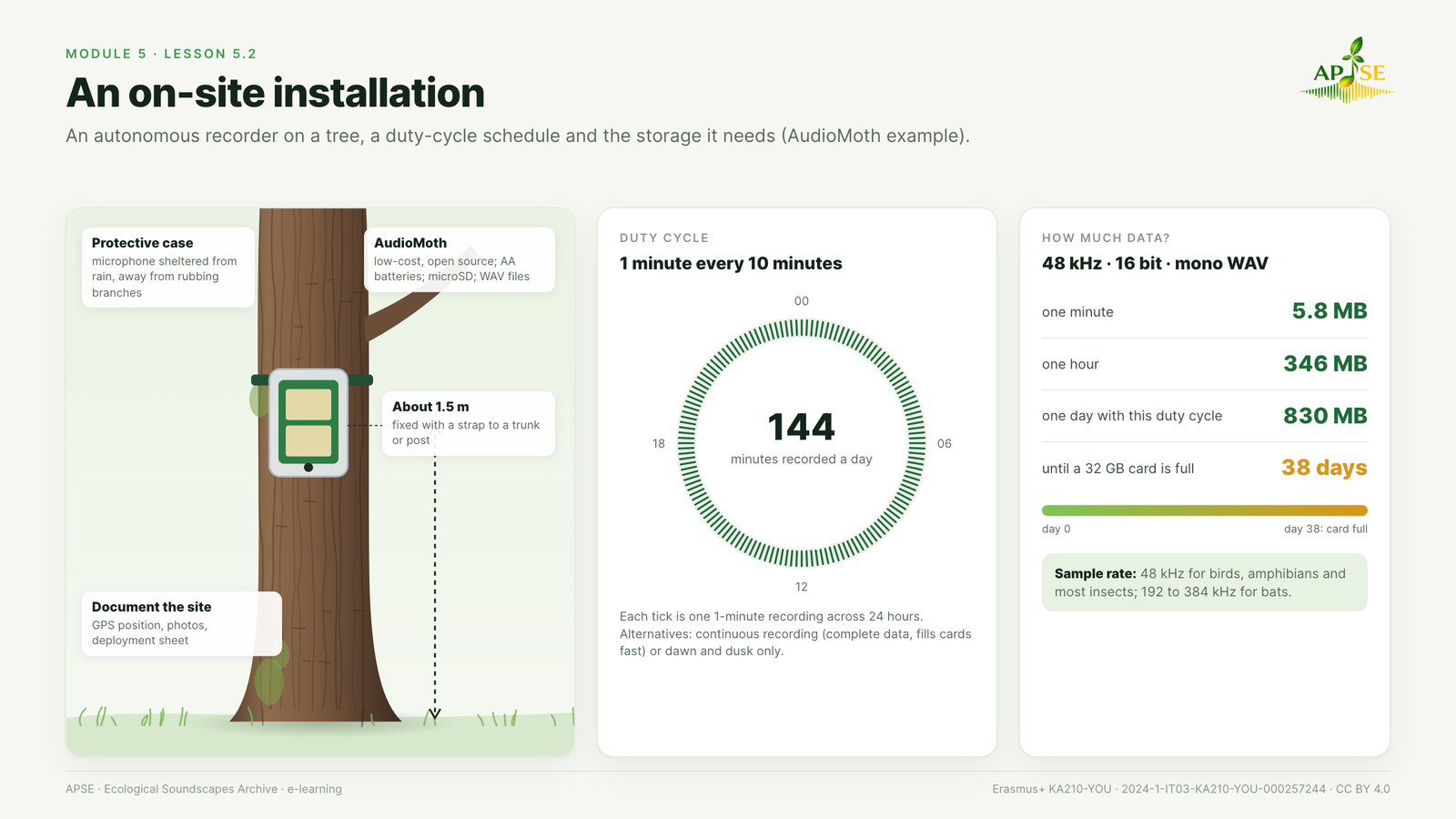
Figure 5.2. An on-site installation. An autonomous recorder on a tree, a duty cycle schedule and the storage it needs.
Passive acoustic monitoring. Autonomous recorders are left in the field for days or weeks and record automatically on a schedule. They cover times and places that people cannot (night, bad weather, remote areas) and they do not disturb animals.
AudioMoth. AudioMoth is a low-cost, open-source acoustic logger developed by Open Acoustic Devices (Hill et al., 2018). It records audible and ultrasonic sounds (sample rates up to 384 kHz), runs on AA batteries, saves WAV files on a microSD card and is configured with a free app. Each file is named with the date and time of the recording.
Planning an on-site installation, step by step.
- Question: what do you want to find out? (for example: which birds are active at dawn in a beech wood; whether bats use a river corridor).
- Sites: choose places that represent the habitats you want to study. Keep recorders far enough apart to avoid recording the same sounds, and away from roads or rivers unless they are part of your question.
- Permissions: ask the park authority or the landowner before installing anything.
- Schedule: continuous recording gives complete data but fills cards and drains batteries quickly. A duty cycle, for example 1 minute every 10 minutes, or recording only at dawn and dusk, makes long deployments possible.
- Sample rate: 48 kHz for birds, amphibians and most insects; 192 to 384 kHz for bats.
- Mounting: fix the recorder to a tree trunk or a post at about 1.5 m, in a protective case, with the microphone sheltered from rain and away from branches that rub in the wind.
- Documentation: record GPS coordinates, take photos of the site and fill in a deployment sheet (site, habitat, recorder ID, settings, date and time of installation, who installed it).
- Maintenance: check batteries and cards regularly, then retrieve the recorder and download the files.
How much data? One minute of WAV audio at 48 kHz, 16 bits, mono takes about 5.8 MB, so one hour takes about 346 MB. With a schedule of 1 minute every 10 minutes (144 minutes per day) you collect about 830 MB per day: a 32 GB card is full in about 38 days. The configuration app shows an estimate of daily storage and energy use, which helps to plan visits to the site.
Try it with a group. Let participants choose, on a map of a nearby park, two places for a recorder and explain why. Then compare the choices: which questions could each place answer?
Watch: Configuring Your AudioMoth (Rainforest Connection, YouTube). Third-party video embedded from YouTube; it is not covered by the course licence (CC BY 4.0).


Funded by the European Union. Views and opinions expressed are however those of the author(s) only and do not necessarily reflect those of the European Union or the Agenzia Italiana per la Gioventù. Neither the European Union nor the granting authority can be held responsible for them.
APSE · Erasmus+ KA210-YOU · 2024-1-IT03-KA210-YOU-000257244 · Licence CC BY 4.0 · Free and open: no registration needed.
