
Open Course › Course 2 › Module 7 · Building the APSE soundscape archive
Module 7 · Building the APSE soundscape archive
Thematic module 4: Practical implementation of the soundscape archive
Module goals. By the end of this module you will be able to:
- describe the steps needed to integrate a soundscape archive into a website;
- explain how artificial intelligence can recognise and catalogue species;
- explain the role of sound mapping and data export;
- apply principles of open participation and user experience (UX/UI) design.
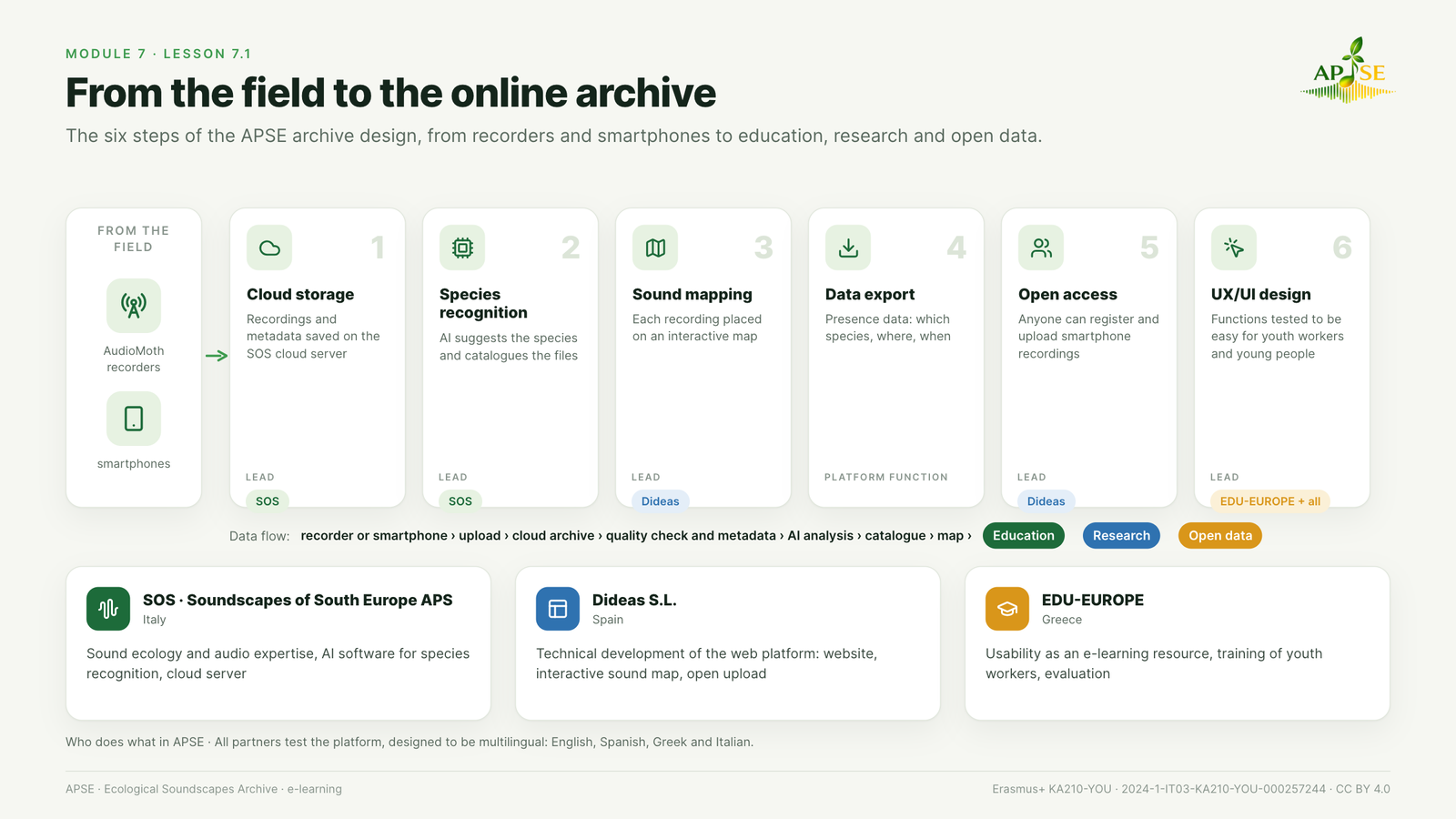
Figure 7.1. From the field to the online archive. The six steps of the APSE archive design and the roles of the partners.
The APSE archive is designed as a web platform that brings together recordings from autonomous recorders and from people, and makes them useful for education, research and awareness. Its integration into the project website follows six steps.
- Cloud storage. Recordings made by autonomous recorders (AudioMoth) are saved and archived on the SOS cloud server, with their metadata.
- Species recognition and cataloguing. AI software analyses the recordings, suggests the species present and catalogues the files.
- Sound mapping. Each recording is placed on an interactive map, so that users can explore the territory through its sounds.
- Data export. Presence data (which species, where, when) can be exported and shared.
- Open access. Anyone can register on the platform and upload their own recordings made with a smartphone.
- UX/UI design. Design choices and functions are tested so that the platform is easy and pleasant to use for youth workers and young people.
Who does what in APSE.
- Soundscapes of South Europe APS (SOS): sound ecology and audio expertise, AI software for species recognition, cloud server.
- Dideas S.L.: technical development of the web platform (website, interactive sound map, open upload of recordings).
- EDU-EUROPE: usability of the platform as an e-learning resource, training of youth workers, evaluation.
All partners take part in testing the platform, which is designed to be multilingual (English, Spanish, Greek and Italian).
The data flow in one line: recorder or smartphone → upload → cloud archive → quality check and metadata → AI analysis → catalogue → map → education, research and data export.
Watch: Uploading Audio to RFCx Arbimon Using Your Browser (Rainforest Connection, YouTube). Third-party video embedded from YouTube; it is not covered by the course licence (CC BY 4.0).


Funded by the European Union. Views and opinions expressed are however those of the author(s) only and do not necessarily reflect those of the European Union or the Agenzia Italiana per la Gioventù. Neither the European Union nor the granting authority can be held responsible for them.
APSE · Erasmus+ KA210-YOU · 2024-1-IT03-KA210-YOU-000257244 · Licence CC BY 4.0 · Free and open: no registration needed.
